AppLogin⚓︎
Generally, there are two categories of app that are built with the nextAuth Mobile SDK:
- authenticator apps: apps used to authenticate a user on websites, from within other apps, etc., and
- apps that require logging in due to personalised or payment functionality.
This scenario describes the latter, i.e. apps that require an AppLogin. An AppLogin is a special session, which is tied to the activity of the mobile app. It is used to let the user log into the app itself, which can then use that session to access a backend directly.
Warning
The AppLogin functionality from the Mobile SDK assumes that the app has (at most) a single account. If you require more than one account in your app, please contact your nextAuth technical support representative.
Warning
The AppLogin functionality requires continuous authentication. For this reason, please ensure that the “pingTime” of the nextAuth Server you are connecting to is sufficiently high. We recommend setting it to a value of 300 (i.e. five minutes) for critical apps and to 600 (i.e. ten minutes) or higher for other types of apps.
You can use the getServer and updateServer API calls to update your server’s parameters.
Configuring SDK⚓︎
We recommend the following settings for the Mobile SDK configuration:
...
"appLoginInactivityTimeout":"5m",
"singleAccount":true,
...
let constants = NextAuth.Constants(
    ...
    appLoginInactivityTimeout: "5m",
    appLoginRequired: true,
    singleAccount: true,
    ...
)
This setting assumes a five-minute inactivity timeout on your AppLogin. If appropriate for your application, you can also set appLoginInactivityTimeout to higher values (see the Configuration Reference for more details).
Info
The AppLogin’s inactivity timeout is based on calls made to the nextAuth Mobile SDK that imply user interaction. For example, a request to get a list of sessions or accounts is a call that implies user interaction. The Mobile SDK expects your app only to make such a call while it is being actively used. Calls related to push notifications do not update the AppLogin’s inactivity timeout, since these are calls that are typically made autonomously and do not imply user interaction.
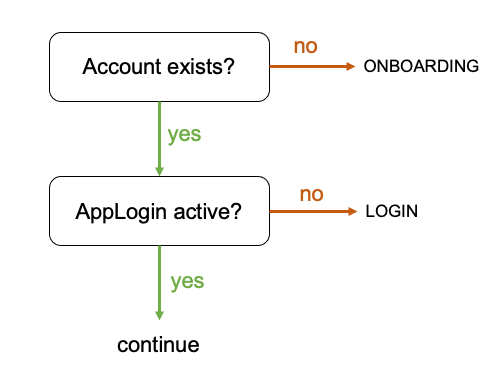
High Level App Flow⚓︎
At every entry point of the app, a check should be made to determine whether or not an account exists. If not, the user should be redirected to your onboarding flow. If the account does exist, then the app should check whether the AppLogin is active. If not, the user should be redirected to your login flow.
Remember that the nextAuth Mobile SDK works asynchronously, and that you thus also need to listen for callbacks globally.
Use code such as the following in the onResume() method of every Activity that should only be accessible when the app is logged in.
if (NextAuth.getNextAuth().getAccountManager().getAccounts().size() > 0){
    if (NextAuth.getNextAuth().getAppLogin().getSession() == null || NextAuth.getNextAuth().getAppLogin().getSession().status != Session.Status.ACTIVE){
        // TODO: Show your AppLogin flow
    }
} else {
    // TODO: Present your onboarding flow
}
In contrast to Android, iOS applications only have a single entry point. We therefore recommend introducing a root view controller which will handle checking whether an account exists and if an AppLogin is active.
if let count = NextAuth.default.accounts?.count, count > 0 {
    guard let isLoggedIn = NextAuth.AppLogin.session?.isLoggedIn, !isLoggedIn else {
        return
    }

    // TODO: Show your AppLogin flow
} else {
    // TODO: Present your onboarding flow
}
Your app should also listen for callbacks/notifications in order to be informed when there is a session update or when an account was removed. When such an event occurs, we recommend the following reactions:
- for a session update, you should check if the AppLogin is still active and if not, redirect the user to your login flow;
- for a removed account, the user should be redirected to the onboarding flow.
Add the following code to the onCallback(Callback callback) method of MyApplication:
if (callback instanceof SessionUpdate) {
    if (NextAuth.getNextAuth().getAppLogin().getSession() == null || NextAuth.getNextAuth().getAppLogin().getSession().status != Session.Status.ACTIVE) {
        // TODO: Show your AppLogin flow
    }
}
if (callback instanceof AccountDeleted){
    if (NextAuth.getNextAuth().getAccountManager().getAccounts().size() == 0){
        // TODO: Present your onboarding flow
    }
}
As you might recall from the Setup section, our iOS Mobile SDK posts local notifications when a session’s state changes. You should therefore register handlers for NextAuth.NotificationNames.accountDelete (available from v1.8.0) and NextAuth.NotificationNames.sessionUpdate as follows.
// MARK: - Observers

@objc func handleAccountDeleteNotification(_ notification: NSNotification) {
    guard let count = NextAuth.default.accounts?.count, count > 0 else {
        return
    }

    // TODO: Present your onboarding flow
}

@objc func handleSessionUpdateNotification(_ notification: NSNotification) {
    guard let session = notification.object as? Session, session.isAppLogin else {
        return
    }

    if session.isLoggedOut {
        // TODO: Show your AppLogin flow
    }
}

// MARK: - UIViewController

override func viewDidLoad() {
    super.viewDidLoad()

    NotificationCenter.default.addObserver(self, selector: #selector(handleAccountDeleteNotification(_:)), name: NextAuth.NotificationNames.accountDelete, object: nil)
    NotificationCenter.default.addObserver(self, selector: #selector(handleSessionUpdateNotification(_:)), name: NextAuth.NotificationNames.sessionUpdate, object: nil)
}
Tip
After your onboarding flow has finished (i.e. when you receive a FlowUpdate callback with Flow.State == DONE for that flow), you should trigger an AppLogin to ensure a smooth user experience. If triggered immediately, the user will not be asked again for inputting their second factor and hence the AppLogin will be transparent to the user.
Logging In⚓︎
An AppLogin can be started directly in the Mobile SDK. There is no need to provide additional information, such as a QR code or a deep link, as it is the app itself that initiates the session, not a browser or other mobile app.
NextAuth.getAppLogin().start();
NextAuth.AppLogin.start()
Handling Callbacks⚓︎
The user will not be asked to confirm, but will go directly to the input of the second factor. The expected sequence of FlowUpdate callbacks (for a given Flow with Type = LOGIN) to be handled is as follows:
State=PROCESSING-- the flow has started, but does not expect any input (yet). See here for more information.State=WAIT_FOR_INPUTandCurrentUserInteraction.Type=VERIFY_SECOND_FACTOR-- asking the user to enter their second factor for verification. See here for more information.State=PROCESSING-- the nextAuth Mobile SDK is verifying the user’s second factor and logging them in.State=DONE-- the flow successfully finished; the user is logged in.
While Being Logged In⚓︎
An identifier for securely retrieving backend data (webNonce) and the username can be retrieved directly from the AppLogin session (at any time while being logged in). This webNonce allows the backend to verify with the nextAuth Server who is logged in for that AppLogin.
String webNonce = NextAuth.getNextAuth().getAppLogin().getSession().getWebNonce();
String username = NextAuth.getNextAuth().getAppLogin().getSession().getAccount().getUserName();
NextAuth.AppLogin.session?.webNonce
NextAuth.AppLogin.session?.account?.username
Info
If one or more backends to retrieve data from cannot communicate with the nextAuth Server directly, it is a good idea to implement a (OAuth 2.0) token service endpoint which does communicate with the nextAuth Server and can hence check that there is someone logged in for the given webNonce. In this scenario, the app then first requests a token based on the webNonce at your token service and then uses the received token to retrieve data from the backend(s).
Logging Out⚓︎
A logout of an AppLogin session can be triggered in a number of ways:
-
explicitly from within the app, by stopping the AppLogin session;
NextAuth.getAppLogin().stop();NextAuth.AppLogin.stop() -
implicitly from within the app, if a timeoutInactivityAppLogin is configured, if there was no user interaction before the configured inactivity timeout;
- explicitly from the server, when the app receives a message from the server telling it to stop the session.
Upon logging out of an AppLogin session, the result of the last successful second factor verification is removed from memory.
Attention
After logging out an AppLogin session, the user will always be required to provide their second factor for the next authentication.