Access Backend Resources⚓︎
When the nextAuth Mobile SDK is used to log into the app itself, i.e. using an AppLogin, you can use the webNonce associated with the session for accessing backend resources securely. Alternatively, you can request an (OAuth 2.0, OIDC or other) token directly from the nextAuth Server if it has been configured to support that.
Info
Through the use of the Data Service, you could also set up secure communication with backend resources. The main difference between these two approaches is that for what is described on this page, user authentication (second factor) will have taken place, whereas the Data Service only gives you device authentication.
webNonce⚓︎
The app can request the webNonce from the nextAuth Mobile SDK when the user is logged in.
String webNonce = NextAuth.getNextAuth().getAppLogin().getSession().getWebNonce();
NextAuth.AppLogin.session?.webNonce
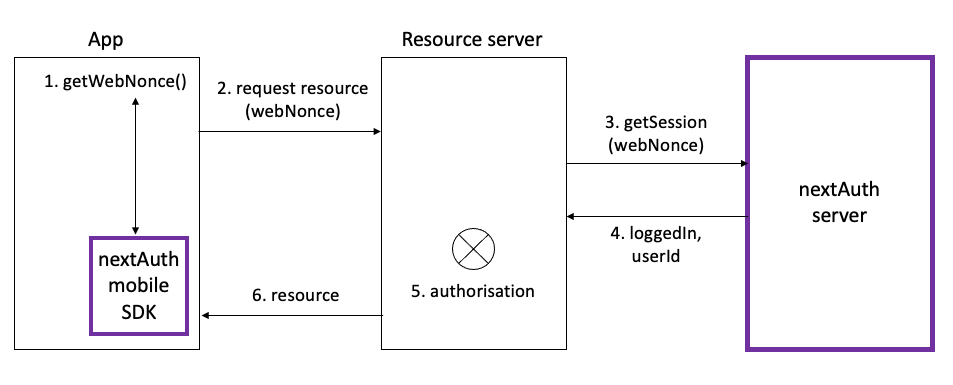
Afterwards, the app can request resources at a resource server using the webNonce associated with the current AppLogin. The resource server then calls getSession from the nextAuth Server’s API to learn whether or not the session associated with the given webNonce is currently logged in, and if so, which user is logged in for the session. Based on the userId from the nextAuth Server and internal access management rules, the resource server determines whether the user is authorised to access the requested resource, and if so, returns the resource to the app.
Note
The details of the communication with the resource server as well as its actual implementation are outside the scope of the nextAuth solution. We only require that the resource server be able to make the getSession call to your instance of the nextAuth Server. We also recommend that you use TLS to communicate with the resource server and that you pin the resource server’s public key inside your app.
Exchange webNonce for a Token⚓︎
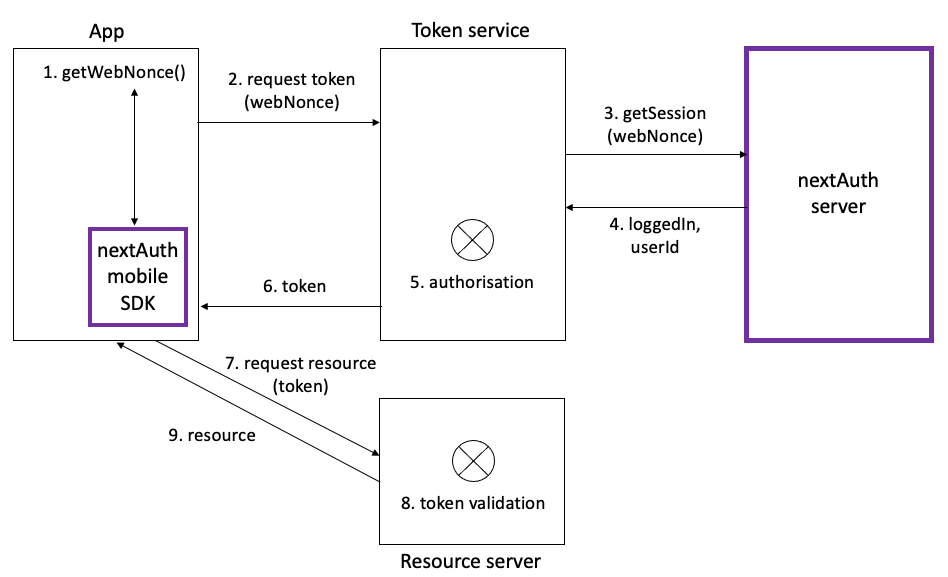
If one or more of the backends from which you retrieve data cannot communicate with the nextAuth Server directly, it is recommended to implement one or more (OIDC, OAuth 2.0 or other) token service endpoints which communicate with the nextAuth Server and can hence check that there is someone logged in for the given webNonce. In this scenario, the app first requests a (OIDC, OAuth 2.0 or other) token based on the webNonce at the token service and then uses the received token to retrieve data from the backend(s).
Note
The details of the communication with the token service and resource server as well as their actual implementations are outside the scope of the nextAuth solution. We only require that the token service be able to make the getSession call to your instance of the nextAuth Server. We also recommend that you use TLS to communicate with the token service and resource server and that you pin the token service’s and resource server’s public keys inside your app.
PKCS for OAuth 2.0 Tokens
Although the exchange of a webNonce for an OAuth 2.0 token can be viewed as the exchange of an authorization code for an OAuth 2.0 token, implementing PKCE (Proof Key for Code Exchange by OAuth Public Clients) will not provide any security benefit. The webNonce arrives directly in the app through the nextAuth Mobile SDK, which also handles user authentication, and hence cannot be intercepted by another (malicious) app. Therefore, nextAuth advises against the use of PKCE for this use case.
Token Validation
Token validation at the resource server typically entails validating the signature on the JWT token. We recommend that you also verify that the signature algorithm is what you expect it to be. This validation allows the resource server to be certain that the user was logged in at the moment the token was created. If the resource server wants to be certain that the user is still logged in at the time of requesting the resource, it could validate the token with the token service, i.e., check if the token has not been revoked. However, when token validation also includes communication with the token service, we advise against the use of tokens and recommend that you work directly with the webNonce as described previously.
Token⚓︎
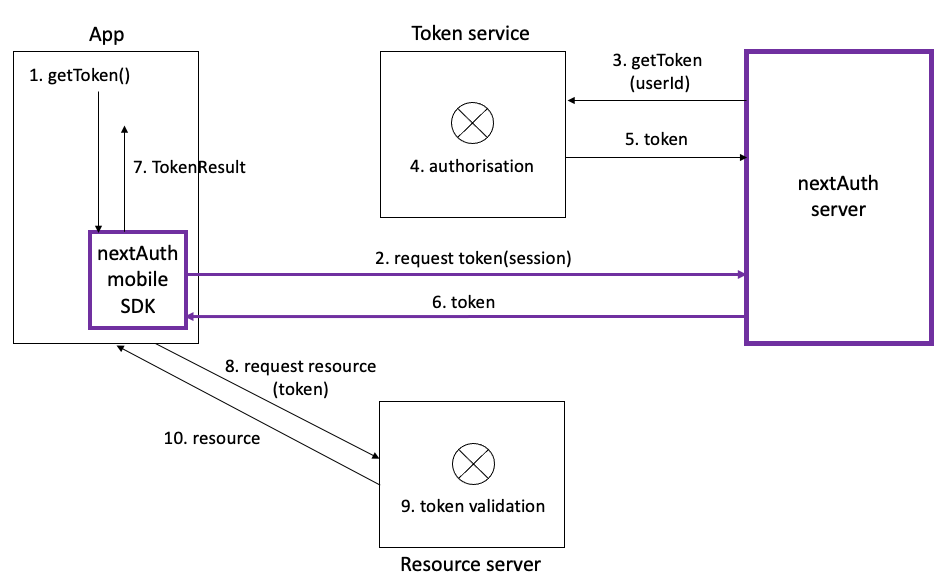
Instead of exchanging a webNonce from the nextAuth Mobile SDK for an AppLogin (which is logged in) and exchanging this in the app for a token, a token can be obtained directly from the nextAuth Mobile SDK if the nextAuth Server has been configured to provide one. Note that this token is returned asynchronously, i.e., the app should listen for a TokenResult callback. The Token returned by the nextAuth Mobile SDK is the verbatim response that the nextAuth Server receives from the token service. This is often a JSON object that contains the expiry as well as the currently valid access_token that is needed to access resources at the resource server. An example can be found below.
{
    "token_type": "Bearer",
    "expires_in": 3600,
    "access_token": "eyJraWQiOiJ3UHdvd.....gkJktHWp4YeLBGRxInAP2n4OpK6g1LmtNsEZw",
    "scope": "openid"
}
Session session = NextAuth.getNextAuth.getAppLogin().getSession();
NextAuth.getNextAuth().getSessionManager().getToken(session);
@Override
public void onCallback(Callback callback) {
     if (callback instanceof TokenResult) {
            Token token = ((TokenResult) callback).token;

            // Raw bytes as received by the nextAuth server
            token.getToken();
    }
}
NextAuth.default.getToken(for: session)
func nextAuth(_ nextAuth: NextAuth, didReceive token: Token) {
    // TODO: Handle the received upstream token
}
Note
The actual implementation of the token service is outside the scope of the nextAuth solution. The token service (or a proxy in between) should implement a getToken method and should return a token according to the nextAuth specifications. Please contact your nextAuth support representative for more information.